



Launch a coin with a collection
One form, two signatures in  Phantom. You get a coin on pump.fun, its own NFT collection with a paid mint open to everyone, and an agent that turns the coin's creator fees into NFTs for its holders.
What you get
- A coin on
 pump.fun, created by your wallet, trading on its bonding curve from the first second.
 - A collection on Solana (Metaplex Core) with your art, names and traits, and a royalty that goes to you.
- A paid mint at your price. Anyone can mint until the supply runs out, and 95% of every mint goes to you.
- An agent wallet that receives 100% of the coin's creator fees and spends them on the collection: it mints, then buys the floor, and drops an NFT to a random coin holder every 30 minutes. See The agent.
- A collection page on mints with the floor chart, thesis, listings and the agent's activity, and a row in the Launches tab of the left column.
Step by step
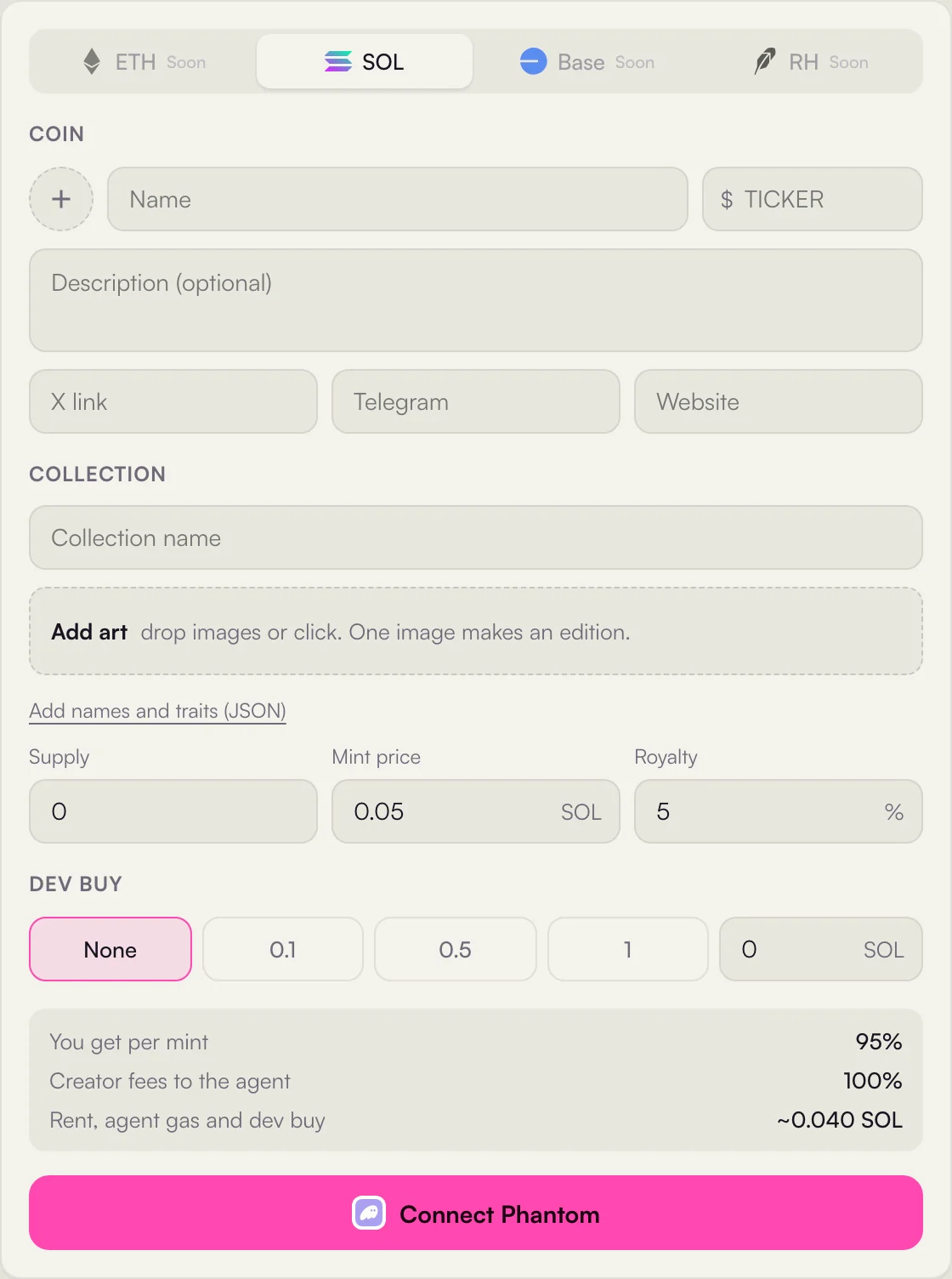
- 1Network Solana. The others are coming.
- 2Coin logo, name and ticker.
- 3Links X, Telegram and website, all optional. Left empty, the website points to your collection page.
- 4Collection name defaults to the coin's name.
- 5Art drop one image for an edition, or many for one of ones.
- 6Names and traits an optional JSON file, see Collection art and metadata.
- 7Supply, mint price, royalty supply is fixed by the art when you upload several images.
- 8Dev buy how much of the coin you buy in the same transaction that creates it.
- 9Summary your share of each mint, the fee split, and what the launch costs you.
- 10Launch one button for the whole flow.
- Fill in the form and press Launch
The coin and the collection are saved as a draft and your art is uploaded. Nothing is on chain yet.
- Signature one: the coin
Phantom shows one transaction that creates the coin on pump.fun, makes your dev buy if you set one, and sends 0.01 SOL to the new agent wallet so it can pay network fees. When it lands, the coin is live and tradable.
- Signature two: the fee split and the collection
Phantom shows a second transaction that sets the coin's creator fee split to 100% for the agent wallet, and creates the collection with the agent as its update authority and your royalty. When it lands, the launch is live and you are taken to the collection page.
- Coin name, ticker, logo, links
- Collection name, art, optional JSON
- Supply, mint price, royalty, dev buy
- Create the coin on pump.fun
- Your dev buy, if you set one
- 0.01 SOL to the agent wallet for gas
- Creator fee split: 100% to the agent
- Create the Metaplex Core collection
- Agent is update authority, royalty to you
- The collection page opens on mints
- Anyone can mint at your price
- The agent starts its loop
What it costs
mints charges nothing to launch. You pay the network and pump.fun, and you fund the agent once.
| Item | Amount | Goes to |
|---|---|---|
| Coin creation | Rent and fees set by pump.fun | The network and pump.fun |
| Dev buy | 0 to 10 SOL, your choice | The bonding curve. You receive the coins |
| Agent gas | 0.01 SOL | The agent wallet of this launch |
| Fee split and collection | Rent of the two accounts | The network |
| Network fees | A fraction of a cent per transaction | Solana validators |
The form shows the total before you sign. Without a dev buy it comes to about 0.04 SOL.
The mint
As soon as the launch is live, the collection page shows a Mint panel with the price and how many are left. Anyone with Phantom can mint. Every mint is one transaction the minter signs:
 0.05 SOL
- The next number of the collection is held for the minter for 150 seconds while they sign. If they do not, it goes back to the queue.
- The agent cosigns as the authority of the collection, so only mints prepared this way can join it.
- The minter pays the price and the rent of the new NFT account, and receives the NFT in their wallet.
Every mint is a trade on mints: it shows as Mint in the Sales tab and the Feed, and the minter appears in Holders. The agent mints through the same path with the creator fees it earns, so it pays the same price and the creator gets the same share. When the supply is gone, the mint closes and the collection trades on mints.
The Launches tab
Every live launch gets a row in Launches, the fourth tab of the left column on every collection page. It lists coins with their collections, sorted by New or by Market cap.
0.42 floor$92.4K▲ 6.10%- 1New or Market cap newest launches first, or the biggest coins first.
- 2Coin and collection the coin logo with the collection's picture as a badge on its corner, the coin's name and ticker, and the collection under it.
- 3Mint progress or floor N of M minted while the mint is open; after the sell out, the floor, or Sold out when nothing is listed.
- 4Market cap and 24h the coin's market cap and its change over 24 hours, from DexScreener, refreshed every 15 seconds.
Click a row to open its collection page. Discover also has a Launched filter that shows only these collections.
Limits
| Field | Limit |
|---|---|
| Coin name | Up to 32 characters |
| Ticker | Up to 10 letters or digits |
| Coin logo | PNG, JPG, WEBP or GIF, up to 5 MB |
| Description | Up to 500 characters |
| Collection name | Up to 32 characters |
| Supply | 1 to 10,000 |
| Mint price | 0.001 to 100 SOL. A free mint would be emptied by bots in seconds |
| Royalty | 0 to 10%, 5% by default |
| Dev buy | 0 to 10 SOL |
Next
How to prepare the art and the JSON file: Collection art and metadata. What the agent does with the fees, minute by minute: The agent.