Buying
Every listing that can be filled on mints has a Buy button. One click prepares the order, your wallet shows what you sign, and the NFT goes straight to your wallet.
Buy the floor
The right column of every collection page has two tabs, Buy and Sell. Under Buy, Buy the floor shows the cheapest listing on top with its picture, price and dollar value, and a big Buy now. Below it are the next cheapest listings, up to 24, each with its own Buy.
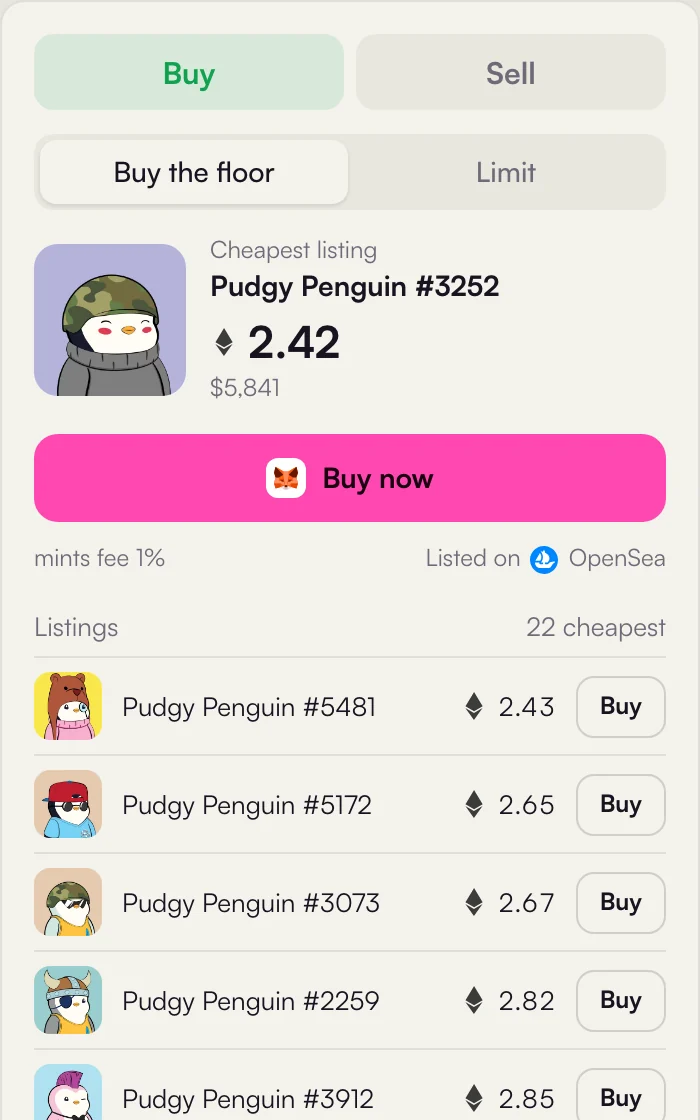
- 1Buy and Sell buy here, or sell what you hold, see Limit orders.
- 2Buy the floor or Limit buy now at the cheapest listing, or place an offer at your own price.
- 3Cheapest listing the floor right now, with its dollar value.
- 4Buy now one click to buy that exact item.
- 5Fee and source the mints fee and where the item is listed, for example
 OpenSea.
 - 6Listings the next cheapest items. One row per item: if an NFT is listed twice, only its cheapest listing shows.
- 7Buy buys that row.
Quick buy
On Discover every row has a Quick buy button. It takes the cheapest listing of that collection that can be filled here and starts the same purchase, without opening the collection.
What happens when you press Buy
The steps depend on the chain and on where the item is listed. In every case you sign in your own wallet and see the amounts before you confirm.
 Ethereum, Base, Robinhood Chain
- You press Buy
- mints asks OpenSea for the order fill
- MetaMask: confirm the purchase
- MetaMask: confirm the 1% fee
- The NFT is in your wallet
 Solana, OpenSea listing
- You press Buy
- mints builds one transaction: the fill plus the 1% fee
- Phantom: confirm once
- mints simulates it, then sends it
- The NFT is in your wallet
Solana, mints listing- You press Buy
- One transaction: price to the seller, royalty to the creator, fee to mints
- Phantom: confirm once
- The platform key moves the NFT in that same transaction
- The NFT is in your wallet
| Ethereum, Base, Robinhood Chain | Solana | |
|---|---|---|
| Wallet | MetaMask | Phantom |
| What you confirm | Two transactions: the purchase, then the 1% fee | One transaction with the purchase and the fee inside |
| Paid in | ETH | SOL |
| Network switch | MetaMask is switched to the right chain for you | Not needed |
| Before sending | MetaMask shows what will change in your wallet | mints simulates it and stops it if it would fail |
An example
The cheapest listing is 2.4 ETH. You confirm 2.4 ETH for the item and 0.024 ETH for the mints fee, plus the network fee of the chain. The seller receives the listing price minus whatever their marketplace and the creator royalty take from their side.
When a purchase shows on mints
A purchase made here becomes a trade on mints: it shows in the Sales tab, the Feed, your position and the leaderboard. On Solana that happens as soon as the transaction lands. On Ethereum, Base and Robinhood Chain it happens once the receipt shows the transaction succeeded, was sent by your wallet and the NFT arrived in it, usually within a minute.
Which listings you can buy here
| Collection | Buyable on mints |
|---|---|
 Ethereum Ethereum Base Base Robinhood Chain Robinhood Chain | Every listing in the panel. They come from OpenSea, which fills them. |
 Solana Solana | Listings placed on OpenSea. Items listed only on  Magic Eden show a Magic Eden button that opens the item there instead. Magic Eden show a Magic Eden button that opens the item there instead. |
| Collections launched on mints | Every listing. They live on the mints order book, see below. |
Buying a launchpad NFT
Collections launched on mints are traded on mints itself. A listing there does not move the NFT anywhere: the owner keeps it in their wallet and gives the mints platform key permission to transfer that one NFT. When you buy, one transaction does everything at once:
- the price goes to the seller, minus the creator royalty,
- the royalty goes to the creator of the collection,
- the 1% mints fee is added on top,
- the platform key moves the NFT from the seller to you.
If any part fails, nothing happens. If the seller moved or sold the NFT somewhere else, the permission is gone with it, so the listing simply cannot be bought and disappears from the list. More in Security and custody.
If something goes wrong
| You see | What it means |
|---|---|
| This listing is gone or cannot be bought here | Someone bought it first or the seller cancelled. The list refreshes, try the next one. |
| The purchase would fail | The simulation failed: the item is sold, or your balance is too low for the price, the fee and the network fee. |
| Transaction was declined | You pressed reject in your wallet. Nothing was sent. |
| Buying is paused right now | Purchases are switched off for a moment, for example during maintenance. |
Want to buy below the floor instead? Place a buy order at your own price: Limit orders.